
To maximize your Amazon FireStick’s potential, you’re in the right spot. Our 2025 tutorial details how to jailbreak your FireStick, set up the popular IPTV Smarters Pro application via a Downloader code, and decide if a VPN suits your needs. Whether you’re a beginner with IPTV or seeking broader content access, this guide prioritizes simplicity and security.
What Does It Mean to Jailbreak a FireStick?
Jailbreaking a FireStick involves bypassing restrictions to install third-party apps not found on the Amazon Appstore. It requires no hardware changes, won’t void your warranty, and is fully reversible. This grants access to live TV, films, sports, and more through apps like IPTV Smarters Pro, TiviMate, KODI, and others.
Why Jailbreak Your FireStick in 2025?
Key reasons FireStick users in the UK and beyond are jailbreaking their devices include:
- Unlock Unlimited Streaming: Reach a broader selection of apps and media.
- Save Money: Reduce costly subscription fees.
- Get More Control: Tailor your streaming to personal tastes.
Step 1: Enable Apps from Unknown Sources
Before adding third-party apps like IPTV Smarters Pro, you must permit installations from unknown sources. Follow these steps:
- Power on your FireStick and navigate to Settings (gear icon).
- Choose My Fire TV > About.
- Highlight your device name and press select 7 times to unlock Developer Options.
- Return and select Developer Options.
- Enable Install Unknown Apps and switch it on for the Downloader app.
✅ Your device is now set for sideloading apps!
Step 2: Install IPTV Smarters Pro Using Downloader
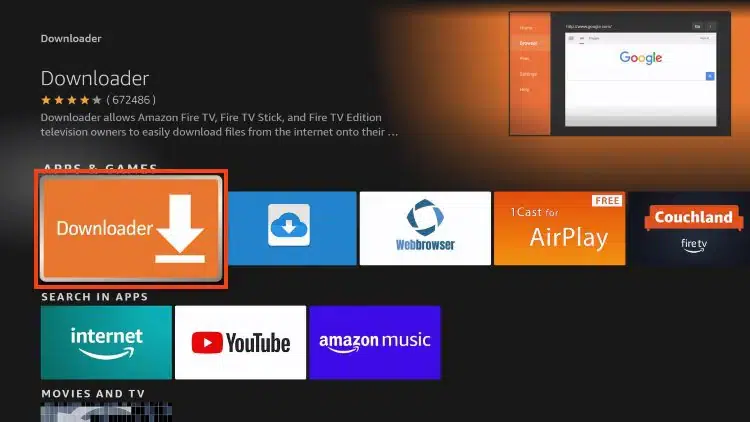
Next, install IPTV Smarters Pro, a top IPTV player for 2025 known for its ease of use.
- From the home screen, go to the Find tab and search for Downloader.
- Select the Downloader app and click Download.
- Open Downloader after installation and accept any permissions.
- In the URL field, input the Downloader code: 78522 and press “Go.”
- The IPTV Smarters Pro APK will download. Click Install when prompted.
- After installation, click Open to start the app.
🎉 Success — IPTV Smarters Pro is now on your FireStick!
Step 3: Set Up IPTV Smarters Pro
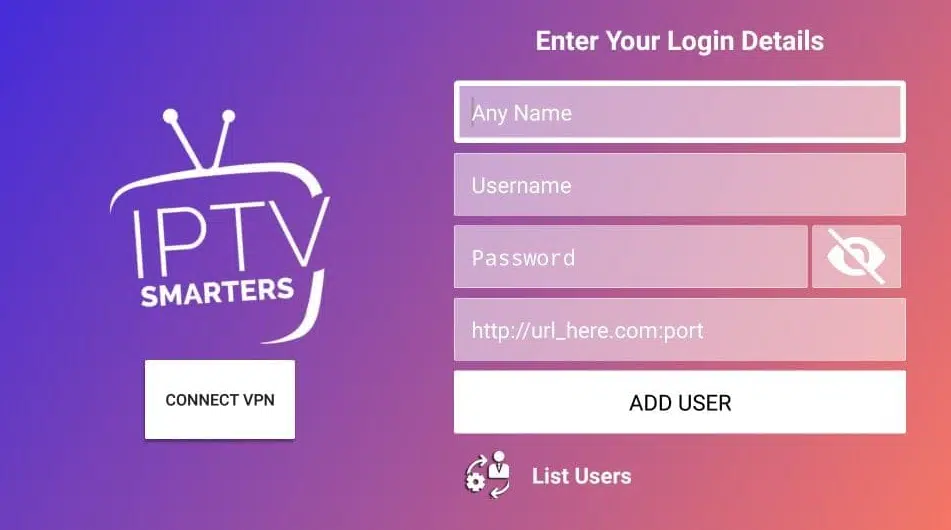
Log in using your IPTV provider’s details:
- Launch IPTV Smarters Pro from “Your Apps & Channels.”
- Choose Login with Xtream Codes API (common for most providers).
- Enter these details:
- Username – from your IPTV provider
- Password – provided by your service
- Server URL – usually in your setup email
- Click Add User to log in and access your IPTV dashboard.
You’ll now have access to Live TV, Movies, TV Shows, and more, all sorted by category.
Should You Use a VPN on a Jailbroken FireStick?

Absolutely — here’s why:
- Online Privacy: A VPN conceals your IP and hides activity from ISPs and others.
- Bypass Geo-blocks: Reach content restricted in your region.
- Prevent ISP Throttling: Avoid speed reductions on IPTV streams with a VPN.
We suggest trusted VPNs such as NordVPN or ExpressVPN. Both provide FireStick-optimized apps with quick speeds and strong encryption.
Final Thoughts
Jailbreaking your FireStick in 2025 is a straightforward way to unlock extensive entertainment options. By enabling unknown sources, installing IPTV Smarters Pro via a Downloader code, and entering your IPTV details, you create a premium media hub.
Use a VPN to ensure security and enjoy private, limitless streaming. Your jailbroken FireStick is now equipped for live sports, UK channels, and 4K films.
🔐 Safe streaming, happy watching!